Smart Locks as Systems: What Installers Need to Know Beyond the Door
Key Highlights
- Locksmiths now need to understand both physical door prep and digital connectivity, including software setup and ongoing system support.
- Modern systems combine hardware with cloud-based management, requiring installers to consider network reliability, gateway placement, and remote operation testing.
- Door sensors and status indicators are critical for distinguishing between lock state and door position, preventing false security assumptions.
- Comprehensive documentation and clear naming conventions during installation facilitate troubleshooting, system expansion, and customer handoff.
- Proactive service offerings, such as battery replacements, firmware updates, and system health checks, create opportunities for recurring revenue and deeper customer relationships.
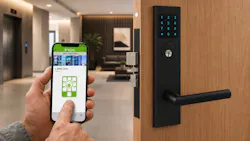
For generations, locksmiths have been responsible for making the door work. That has always meant more than simply installing a lock. A good locksmith understands door prep, handing, backset, latch alignment, strike engagement, key override, closer adjustment, frame condition, fire and life-safety requirements, and long-term reliability. When a customer says, “The lock doesn’t work,” the real problem may be a sagging door, a misaligned strike, weatherstrip pressure, a failing closer, or an opening that was never prepped correctly in the first place.
That mechanical expertise is still the foundation of the trade. But with today’s digitally connected locking systems, the job no longer ends at the edge of the door.
Modern smart locks are increasingly part of cloud-managed access control ecosystems. They may communicate with mobile apps, gateways, door position sensors, web portals, audit trails, real-time alerts, and credential management platforms. A lock is no longer just a piece of hardware mounted to an opening and operated by a mechanical key. It is often one endpoint in a larger system that property managers, facility directors, staff, residents, vendors, and service providers rely on every day.
For locksmiths and access control installers, this shift creates both new responsibilities and new opportunities. The installer still needs to make the door operate correctly, but now there must also be an understanding of connectivity, software setup, customer handoff, documentation, and ongoing support.
From Standalone Hardware to Connected Systems
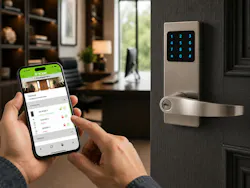
The commercial locking industry has moved through several stages. Mechanical locks gave way to standalone digital keypad locks, which improved convenience but required programming at the door. From there, many facilities moved toward electrified locking and access control systems that offered more centralized management but also introduced greater complexity and cost. These systems require control panels, power supplies, dedicated wiring, credential readers, servers or dedicated PCs, software licenses, and ongoing coordination between locksmiths, integrators, IT teams, and facility managers.
Today’s cloud-connected smart locks and access control devices are changing that model again. By moving much of the infrastructure into the IoT and cloud environment, modern systems can deliver integrated access management with less hardware, simpler deployment, remote administration, and a more efficient path for scaling from one opening to many. These benefits translate to the residential smart lock market as well.
A modern system may include smart cylindrical locks, smart mortise locks, smart deadbolts, smart interconnect locks, reader/controllers, electric strikes, exit device integration, gateways, door position sensors, mobile credentials, RFID credentials, passcodes, audit trails, alerts, user roles, schedules, and web-based dashboards.
For the customer, the appeal is clear. Instead of handing out and tracking keys, rekeying after turnover, or sending someone to each door to make programming changes, administrators can manage users and openings remotely in real time. They can issue temporary passcodes, revoke credentials, schedule access for vendors, review activity, and respond to alerts.
For the locksmith, the important takeaway is this: the “lock” is no longer the whole system. It is one connected device within a larger access control environment. Installing it correctly requires understanding both the physical opening and the digital workflow that surrounds it.
Locked Does Not Always Mean Secure
One of the most important lessons in connected access control is that “locked” and “secure” are not always the same thing. An opening may appear as “locked,” but if the door is standing open, the opening is not secure. If an auto-lock timer relocks the device while the door is propped or held open, the system may show a locked state even though the opening remains accessible.
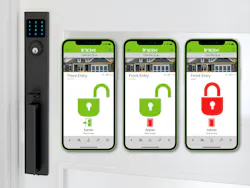
This is where door position sensors become critical. A door position sensor helps the system distinguish between lock status and door status. The most useful systems make this intuitive by showing Locked/Unlocked and Open/Closed information together on the same screen. That gives the user a complete picture of the opening at a glance.
For example, “Locked / Closed” tells the manager the opening is secure. “Locked / Open” may indicate that the lock relocked while the door was ajar. “Unlocked / Closed” may indicate an opening in passage mode or an unlocked state. “Unlocked / Open” may show active use or a door that has been held open.
This is more than a software feature. It ties directly back to the locksmith’s mechanical expertise. If the door does not close reliably, if the closer is weak, if the latch does not align, if the frame is out of square, or if weatherstripping prevents full closure, the electronic system will report problems. Many “smart lock issues” are really door issues being exposed by the system.
Gateways and Connectivity
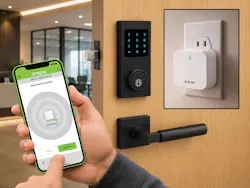
That means gateway placement can be just as important as lock installation. Installers should consider range, wall construction, signal interference, power outlet location, Wi-Fi availability, and the customer’s network environment. A lock may be installed perfectly, but if the gateway is too far away, unplugged, blocked by construction materials, or connected to an unstable network, the customer may experience problems that appear to be lock failures.
Locksmiths do not need to become IT administrators, but they do need to understand enough to ask the right questions. Is there reliable Wi-Fi at the site? Who provides the network credentials? Are there restrictions from the customer’s IT department? Is a Wi-Fi gateway or PoE (Power over Ethernet) gateway the best option? Is the gateway named and documented? Has remote operation been tested before leaving the site?
A basic connectivity check can prevent many callbacks. After pairing, the installer should verify that the lock reports status correctly, remote commands work where applicable, and the gateway remains online. If remote management is part of the customer’s expectation, it must be tested as part of the installation.
Alerts, Audit Trails, and Work Orders
Cloud-managed access systems can generate real-time alerts for conditions that previously might have gone unnoticed. These may include doors left open, low batteries, failed lock or unlock events, repeated denied credential attempts, offline locks, offline gateways, possible forced door events, or openings that do not relock as expected.
Audit trails add another layer of visibility. They can show who accessed an opening, when access occurred, what credential type was used, whether access was granted or denied, and what system events took place. However, installers should understand that audit trail capacity varies by system. Some platforms store only a limited number of recent events. Others retain tens of thousands of records. High-capacity systems may hold up to 100,000 audit trail records.
For locksmiths, alerts and audit trails can become the foundation for electronic work orders. Instead of waiting for the customer to call and say, “The lock is acting up,” the system may identify its own service needs.
A low-battery alert can generate a preventive maintenance visit. A repeated “door not closed” alert may lead to closer adjustment, hinge repair, or strike realignment. Gateway offline notifications may lead to a connectivity check. A pattern of failed access attempts may prompt credential review or customer training. A history of door-held-open events may lead to a conversation about security procedures.
This changes the service model from reactive to proactive.
Proactive Service and Recurring Revenue
Connected systems create new ways for locksmiths to stay involved after installation. Service providers can offer battery replacement programs, system health checks, door alignment inspections, gateway and connectivity reviews, credential audits, firmware or app update assistance, user training, scheduled maintenance for high-use openings, and documentation updates after tenant or staff turnover.
For commercial and multi-property clients, the opportunity goes beyond service calls. Enterprise-ready access management platforms often create value through software. Larger commercial customers are often willing to pay for SaaS licenses because the software scales processes, reduces administrative labor, improves visibility, and helps standardize access control across many openings.
These licenses may be priced per opening, per device, per unit, per user, or by property size depending on the platform. Locksmiths and integrators who understand the system can participate in that recurring revenue by selling, setting up, supporting, and training customers on the software.
This is especially relevant for multi-family communities, mixed-use properties, office portfolios, senior living environments, K-12 and higher education campuses, and other multi-opening clients. A web portal that manages hundreds or thousands of doors can save significant time. Features such as batch move-in and move-out, bulk credential creation, CSV import/export, auto-assigning units, user role management, scheduled access, automatic credential revocation, real-time device status, and audit trail reporting can be powerful at scale.
The locksmith’s value is no longer limited to installing the lock and providing rekeying services. A modern locksmith can stay connected to a project by helping the customer operate the system efficiently. That may include training property staff, setting up naming conventions, explaining user roles, helping create credential workflows, and reviewing reports.
This moves the trade toward ongoing service, support, software enablement, and lifecycle management. For locksmiths willing to learn the platform side of the business, connected access control can create deeper customer relationships and significant recurring revenue.
Commissioning Is the New Final Step
In the past, an installer was finished with the job when the hardware was mounted, the latch retracted, the key worked, and the door closed properly. With smart locks, that is only the first part of the installation.
Commissioning is now a critical final step because the installer is not just mounting hardware; they are building the customer’s access system. In a modern IoT platform, the locksmith may begin by creating a property in the mobile app, then adding each lock, reader/controller, and gateway as devices are installed. Each device should be assigned to the correct building, floor, and unit, and named clearly so the system is easy to understand after handoff.
Once the hardware and app setup are complete, the installer can test credentials, pair gateways for remote management, verify locked/unlocked and open/closed status, confirm door position reporting, and check that events are appearing properly in the audit trail. Instead of leaving the owner to configure the system later, the locksmith can deliver a fully tested property and then transfer ownership or administrative control to the end user, owner, or property manager.
That handoff matters. A poorly organized system creates problems later. If every device is named “Lock 1,” “Lock 2,” and “Gateway 3,” future troubleshooting becomes difficult. A well-commissioned system uses clear names such as “Building A – Unit 204 Entry,” “Main Office – Rear Door,” or “Clubhouse Mechanical Room.” Good naming at installation makes service, training, audit review, and expansion much easier.
Commissioning should be treated and billed as part of the job scope, not an afterthought.
What Installers Should Document
Good documentation is now essential. At minimum, installers should record the lock model, serial number, property name, building, floor, unit, gateway name, gateway location, devices assigned to each gateway, credential types enabled, door position sensor status, battery type, mechanical key override details, and installation date.
Photos are always useful. Finished installation photos, strike photos, DPS placement photos, and door condition photos can protect the installer and help with future service. If the door is sagging, the frame is damaged, or the closer needs adjustment, note it clearly.
Inside the app or web portal, devices should be organized by name and location. A property manager should inherit a system that makes sense. Clear organization helps with account handoff, troubleshooting, audit trail review, customer training, expansion, and future service.
Documentation should also include who received administrative access, what training was completed, and what maintenance schedule was recommended.
Training and Handoff
Customer handoff should include more than telling the owner to download an app. The installer should confirm that the customer understands how to accept ownership or administrative control, add and remove users, issue temporary credentials, assign users to doors or groups, respond to alerts, interpret low-battery warnings, and understand when remote unlock will or will not work.
The customer should also understand that gateways must remain powered and connected. If someone unplugs a gateway to use the outlet for something else, remote features will stop working. If the Wi-Fi password changes, devices may need attention. If staff members with administrative rights leave the organization, permissions should be updated immediately.
For enterprise clients, training may include batch tools, move-in and move-out workflows, auto-assignment features, credential imports, user roles, reporting, and audit trail access. This training can become part of the locksmith’s professional service offering.
The final handoff should make clear who owns the property account, who has administrative authority, who manages users, and who to call for hardware, software, or connectivity questions.
Mechanical Fundamentals Still Matter
Even with all this technology, the physical opening remains the foundation. Smart access control does not eliminate traditional locksmith skills. It makes them more important.
A connected lock still depends on accurate door prep, correct backset, proper handing, latch and bolt engagement, strike placement, closer adjustment, battery access, key override, ADA compliance, egress requirements, and fire-rated opening rules. The installer still needs to understand the door, frame, hinges, strike, seals, thresholds, and traffic conditions.
Consider a door with a weak closer. The smart lock may function perfectly, but the door may not latch consistently. The customer sees alerts and assumes the electronics are failing. Or consider an electric strike on a misaligned opening. The access system may grant entry, but the hardware binds under pressure. Again, the software may be blamed for a mechanical problem.
A smart system can report symptoms, but only the locksmith knows the true cause. Door sag, warped frames, loose strikes, poor closer adjustment, weatherstrip pressure, and high-traffic wear are still field problems that require field expertise.
System resilience is also part of the installation. Smart locks may rely on batteries, gateways, or cloud connectivity for advanced features, but openings still need dependable local methods of operation, such as mechanical key override and a manufacturer-approved way to provide temporary power when batteries are discharged.
That is why locksmiths remain essential as access control becomes more connected. IT providers may understand networks and software companies may understand apps, but neither replaces the field knowledge required to make a real door operate reliably. Successful smart lock service providers will be the ones who can bridge both worlds: the connected platform and the physical door.
The Future Is System-Aware Locksmithing
Smart locks may be managed in the cloud, but they still succeed or fail at the door. That is the central point installers need to remember.
The locksmith’s role is expanding, not disappearing. The best installers will combine mechanical expertise with practical knowledge of mobile apps, gateways, cloud platforms, credentials, door status monitoring, alerts, audit trails, enterprise web portals, SaaS licensing, and service workflows.
The future belongs to locksmiths who can work on both sides of the opening: the physical door and the connected system behind it.
About the Author
Paul Grant
Paul Grant is Marketing Manager at INOX by Unison Hardware, a provider of smart access management solutions and mechanical door hardware and for commercial and residential openings. For more information, visit www.inoxsmart.com.