Unboxing the NAPCO MVP Access System
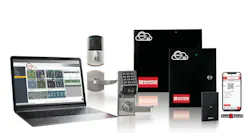
For this Trusted Tools review, we are unboxing and checking out the multi-lock gateway for Trilogy Networx or Marks USA deadbolts on the NAPCO MVP access system, which can be wired or wireless.
MVP is a cloud-hosted access platform built to help security professionals win more business, generate recurring monthly revenue, and deliver a better customer experience. With fast installs, easy system expansion, and simple flat-rate per-door pricing — and no annual service contract — MVP lowers total cost while increasing sales opportunities. MVP helps locksmiths bid competitively, grow accounts effortlessly, and build long-term customer satisfaction from a single, scalable access solution. All this product is available from your favorite lock or security distributor.
The MVP Access or EZ multi-lock gateway is very convenient to use. The MVP EZ App and Scan2Enroll™ let you add panels and wireless locks in seconds, streamline deployments, and give customers intuitive control.
MVP comes in two levels that share the same database, same hardware, and the same flat-rate-per-door model.
MVP EZ: App-only. Scan a QR code with your phone (Scan2Enroll), enroll the device, and manage doors from a smartphone. This is built for locksmiths and smaller jobs.
MVP Access: Full enterprise. Browser and app, roles and privileges, multi-site, video, badging, lockdown/threat levels. The same account can grow into this without converting data or swapping panels, wireless locks or any hardware. It can use ID credentials of your choice: prox, MIFare, NFC and biometrics.
The multi-lock gateway (not required for panels) that we are unboxing has a low-voltage transformer and all necessary wiring, allowing you to simply plug it in and go from there. You can also plug it directly into your router. It comes with all the instructions and mounting hardware included. (No AC? Use the identical PoE version.)
Next, we cover the NAPCO Access 2 in 1 door controller system for the MVP cloud-ready EZ or enterprise access platforms. As we open the box, all you need to get started is to plug the provided 12V DC power supply into a wall outlet and wire it into the controller's 12V DC input connection.
The Napco Access embedded system, simple, self-contained and browser-based -- no more software to load, no more license to fuss with. This is compatible with the power supply.
Photo 3 shows the unboxing of the door reader itself. It comes with instructions, mounting hardware, a mounting plate that simply mounts to the wall with the proper screws and plugs right into your power source.
Photo 8 shows all of the different key fobs and door position sensors that are included.
Stay tuned for an installation article and video next month.
Visit https://napcosecurity.com/products/mvp-access/ for more information.
Wayne Winton is the owner of Tri-County Locksmith Service in Glenwood Springs, Colorado, and president of the ALOA Security Professionals Association.
About the Author
 Wayne Winton
Wayne Winton
Wayne Winton, CRL, AFDI, CAIis the owner of Tri-County Locksmith Services, located in Glenwood Springs, Colorado, and the president of the ALOA Security Professionals Association.