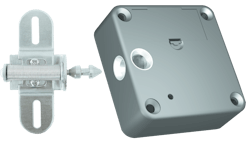
Access control can refer to many different requirements and customer requests. A primary feature of mechanical locks is some type of visible keyhole or dial in order to operate the mechanism. The new Prox N' Lock by RCI solves that problem. No keyway or dial is needed. Unlocking is accomplished by placing either RFID-equipped cards or RCI keyfobs on the face of the cabinet and near the location of the Prox N' Lock. The outer surface of the drawer or door remains unblemished, showing no indication of the lock system on guard. Up to 50 users can be programmed into an RCI 3590 cabinet lock.
The RCI 3590CRD Prox N' Lock package contains one 3590 cabinet lock, one standard locking pin, one 3 volt lithium battery, one programming card and two proximity cards. The RCI 3590FOB package is identical except that the two proximity cards are replaced by keyfobs.
Basically the 3590 cabinet lock is installed on the inner surface of the moveable door or drawer. The locking pin is installed on nearby framework inside the cabinet. The RCI 3590 lock contains two locking sockets which allow for either a vertical or horizontal lock installation.
In operation, as the door or drawer is closed, the locking pin enters the socket and a spring-operated bolt automatically engages the locking pin, securing the door or drawer. For unlocking, a properly programmed card is momentarily held close to the face of the door or drawer and near the location of the 3590 lock. A chime will sound as the card is recognized by the lock, indicating that the spring bolt has released the locking pin and the door or drawer can be opened.
Initializing & Programming
Before installing a 3590 Lock N' Prox cabinet lock, the unit must be initialized and programmed. Install the Lithium battery following the polarity instructions printed in the battery case area. RCI states that the lithium battery will provide a minimum of 30,000 openings.
Inside a cutout on the rear of the lock body is a small square button. Use a suitable probe to press the button. The lock unit will then make a ticking sound. Within three seconds, place a programming card in contact with the lock body. Two tone signals will confirm that the programming card has been initialized. The programming card can now be used to add or delete user cards or keyfobs.
To add a user card or keyfob: Place the programming card in contact with the lock. The 3590 will make a ticking sound. Within three seconds, place a user card or keyfob in contact with the lock. Two tone signals will confirm that the reading in was successful.
To delete a user card or keyfob: Place the programming card in contact with the lock. The 3590 will make a ticking sound. Within three seconds, place a user card or keyfob in contact with the lock. Two tone signals will confirm that the enrollment cancellation was successful.
If a user card or keyfob is lost or stolen, place the programming card in contact with the lock unit for at least 10 seconds. Multiple beeps will occur as all user cards and keyfobs are erased from memory. Each valid user card or keyfob must then be re-entered using the "add user" instructions.
Lock Installation
No two desks or cabinets are constructed in the same way. The RCI 3590 cabinet lock and locking pin are designed to be installed on two surfaces which meet and are at right angles to each other. On any installation, measure twice, install once. The inner drawer surface for this installation was found to be located 1/2" below the inner cabinet structure where the locking pin was to be installed. The solution was to make a 1/2" thick shim to fit under the locking pin to make up the difference.
Installation instructions included with the RCI 3590 lock recommends installing the lock body first. Use a 7/64" drill bit to drill a starting hole for one of the four retaining screws. Fasten the lock in place making sure it is parallel to the drawer unit. Continue drilling the remaining three holes and install the retaining screws firmly without overtightening.
When the locking pin is installed into the lock body, the centerline for the locking pin retainer screws was found to be approximately 1 5/8" away from the back edge of the lock body. Make sure the locking pin is in line with the lock body locking socket and the locking pin centerline is 1 5/8" back from the front of the cabinet structure, then mark the hole locations for the locking pin mounting screws.
The drawer unit for this application was 5" deep. The drawer support rail prevented use of a standard 1/4" drill motor. The solution was to use a 90-degree attachment to drill the locking pin retainer screw holes. An offset screwdriver was used to install the screws.
The locking pin mount provides both sideways and in/out adjustment. First, loosen the in/out adjustment screws and move the locking pin to its full outward adjustment position. Slowly close the drawer to test for locking pin alignment issues. The locking pin is secured in the chassis by an expansion spring, plus the locking pin passes through an enlarged hole in the locking pin chassis. Therefore the exact location of the locking pin is not critical because the pin has partial horizontal and vertical movement so it can "find its way" into the lock body socket.
Continue adjustments until there is approximately 1/8" free play when the drawer is locked. Test the installation several times with a user card or keyfob. Each time the card or fob is inserted near the 3590 location, a chime should sound indicating that the lock is unlocked and the drawer or door can be opened. An audible warning is sounded if the battery is near failure. At complete battery failure the RCI 3590 reverts to a "fail unlocked" state.
It sometimes takes longer to explain an installation than to actually do one. Only six screws are needed to install an RCI 3590. Except for making the required 1/2" shim, actual installation time took less than 15 minutes.
Our RCI 3590 was installed on the front of a wooden cabinet drawer. Installations can also be done in other ways such as on the rear surface of the drawer or on metal cabinets. If the cabinet lock is mounted either in a remote section of the cabinet or on a steel cabinet, an optional external reader can be used. The external reader is plugged into the lock body and a small hole is drilled at the front of the cabinet. When the user card or keyfob is placed near external reader, an unlocking signal is sent back by wire to the 3590 lock unit.
Other optional accessories include an external antenna and a kit for mounting the 3590 on glass showcase units. A special alarm version of the RCI 3590 Lock N' Prox is also available. The 3590ACRD package contains two user cards and the 3590AFOB contains two keyfobs in place of the user cards. Alarm will sound if door or drawer is either held open for extended periods or if the lock is forced open. Factory order functions include time delay, silent operation and toggle operation.
The RCI 3590 Lock N' Prox cabinet lock is easy to install, simple to program and provides an ideal solution when security needs to be concealed. For further information contact your local locksmith distributor or: Rutherford Controls, telephone 800-265-6630 or e-mail [email protected].
To read additional Locksmith Ledger articles on RCI products, visit http://tinyurl.com/RCI-0113.
About the Author
