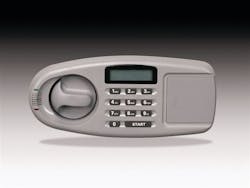
Mechanical safe locks have always used similar construction. When required to change the combination on an unfamiliar safe lock, removal of the lock cover and a quick visual inspection of the individual parts usually easily helps to identify the amount of wheels and whether it is a hand change or key change lock.
Since there are few moving parts in an electronic lock, visual inspection is less helpful in determining how to change the combination. The following examples are only a few of the many types and varieties of electronic safe locks. Each manufacturer has its own system for combination changing. During the coming months we will be adding to this list.
Note: always make a written record of the new combination numbers before beginning combination changing. This will eliminate possible number transposition errors during the combination changing procedure and will provide your customer with a written record upon completion.
AMSEC: All AMSEC ESL10 combinations must contain six digits. To unlock the ESL10 lock, first press "C" to start the electronics. Next press the existing six-digit combination, and then press the # key. The lock will remain in the unlocked cycle for three seconds. During the three second period, turn the safe handle and open the safe door.
To change the combination, set the lock in a locked position with the door open. First press "C", then "#". This activates the change routine. A flashing red light and a warbling tone indicate that the safe lock is ready for programming. Now key in the existing combination, then press "#". A tone will sound indicating the lock is ready for the next step. Key in the six digits of the new combination, then press "#". A tone will sound indicating the lock is ready for the next step. Again key in the six new combination digits, then press "#". An extended tone will sound indicating the new combination has replaced the old combination. Test the new combination several times with the door open before finally closing and locking the door.
BRINKS: Enter the current safe combination. Wait for a green LED light to illuminate on the keypad. A red light indicates that the wrong combination has been entered. Within five seconds after the green light illuminates, open the safe door. Press the red button which is located inside the safe door and near the safe lock cover. Two beeps will sound and the LED light will turn to yellow. The safe lock is now set to accept a new safe combination. Enter a new combination consisting of three to eight numbers. Press the letter "B" on the keypad to complete the combination changing process. Two beeps will be sounded and the yellow LED light will again illuminate to indicate that your new code has been entered correctly. With the door open, push the handle to a locked position. Enter the new combination followed by pressing the letter "A". Move the handle to the unlocked position as a test to verify that the new combination is operating correctly.
GARDALL (microwave safe): To open: Press the START button and key in the existing code. A green light should illuminate and a chirp should sound. Turn the knob to open. Safe combinations must contain 6 digits. The Gardall safe is programmed to accept two different user codes. Combination changing must be done with the safe door open.
To change the first user code: Press the START button. Key in the new 6-digit code. Press the white or red memory button located inside the safe door. The first user combination is now changed. Test the new combination a few times with the door open before relocking the door.
To change the second user code: Press the white or red memory button located inside the safe door. Press the START button. Key in the new-6 digit code. The second user combination is now changed. Test the new combination a few times with the door open before relocking the door.
KABA LC SERIES: Usable combinations consist of six digits such as 40 24 30. Press the "*" key to start over whenever a mistake is made while keying in the numbers. To operate the lock, key in the existing combination. Immediately turn the handle to unlock the safe. An approximate 4 second opening time is allowed before a beep and flashing red & green lights indicate the lock has relocked.
Kaba LC safe locks allow single mode operation with two users, user 1 and user 2, each with a different combination which will unlock the safe. Kaba LC locks can also be set into a dual custody mode requiring both user 1 and user 2 to be present and to key in their individual combinations before the safe will unlock. This article will specifically refer to single mode usage.
Perform all combination changing procedures with the safe door open. To change the user 1 combination: Press "#", then press "1". To change the user 2 combination: Press "#", press "#" again, then press "1". In each case a green light and tone indicate the lock is ready for the next procedure. Key in the existing combination. The green light and tone indicate the lock is ready for the next procedure. Enter the new 6 digit combination. The green light and tone provide a 'ready' indication. Enter the new 6 digit combination again for verification. Green and red lights will illuminate and a tone indicates that the combination has been changed. Try the new combination several times with the door open before closing and locking the safe.
LaGard 3802: Open the safe using the existing combination. To change the combination: Set the lock to a locked position with the door open. Safe combinations must consist of 6 digits. To change the combination: press 000000 to set the lock to the combination change mode. Key in the existing combination. Key in the new combination. Key in the new combination again. The combination has now been changed. Try the new combination several times with the door open before closing and locking the safe.
NL Lock by LpLOCKS: Enter existing code to unlock safe. The safe door must be opened during a 3 second time period or the lock automatically relocks. Conduct combination changing with the safe door open. Operating combinations must consist of 6 digits.
To change the combination: Press and hold the "0" key until a double signal is sounded. An indicator light will remain 'on' during the combination changing procedure. Enter the existing combination. A double signal will be sounded. Enter the new 6 digit combination. A double signal will be sounded. Enter the new 6 digit combination again. A double signal will be sounded. The safe combination has now been changed. A long signal indicates that an entry error has occurred and the old combination will remain in opeation. Test the new combination operation several times with the door open.
S&G 6120: All locks contain a Master Code. The 6120 can always be opened with the Master Code. All 6120 codes must contain six digits. The keypad contains 10 combination buttons lettered with both numbers and letters. Numbers and letters can be used more than once such as AAAAAA or 2A2A2A. The S&G 6120 also contains a time delay feature which will not be covered in this article.
To change the master code: Press SG* (existing master code) # 1 *(new master code) # (new master code) #. Each time the (#) sign is pressed the 6120 will sound a series of chirps. Wait for the chirp sound before continuing. A long, almost continuous series of chirps indicates that the new combination has not been accepted. The existing combination will remain in use.
Eight different user codes can be programmed into the S&G 6120. User codes are numbered 2-9. To change or add a user code: Press SG* (master code) # (user ID 2-9) * (new user code) # (new user code) #. Each time the "#" key is pressed the 6120 will emit a chirp sound. Wait for the chirp sound before continuing. A long, almost continuous series of chirps indicates that the new combination has not been accepted. The existing combination will remain in use.
About the Author
