Electromechanical locks have been in the market for more than 25 years, evolving from standalone battery operated, to wired, and then wireless access mechanisms. They have become smaller and more efficient, with a large number of users in the commercial market. Residential versions of the electromechanical lock have grown in popularity over recent years, prompting mechanical lock manufacturers to sell both commercial and residential versions.
Commercial electronic locks boast a very industrial look; it’s an aesthetic indicative of their market. Most feature an impressive keypad, practical for controlling access and entry in commercial environments. Many are vandal resistant with clutched outside levers, stainless steel buttons, and solid, functional metal lock bodies. These locks are built to hold-up to repeated, daily use from a large number of people.
The residential market demands different features for its users. The need for bulk and heavy-duty functionality does not apply as residential and light commercial users have limited exposure to potential vandals. Further, the locks need an attractive aesthetic that fits a natural finished wooden entry door typical of residential homes. In short, they must be attractive locks that people will "ooh" and "ah" to see. The wear and tear needs are different as well; these locks need to hold up against school aged adolescents and families.
Emtek, an ASSA ABLOY Group company, is known for its vast array of hardware options for residential doors and cabinets. Emtek brings the sense of style that it applies to locks, deadbolts, and entrysets to their electronic locks.
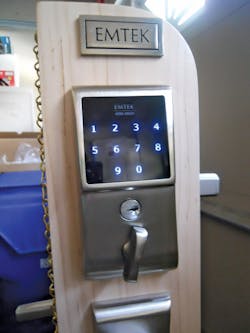
Emtek released the EMTouch™ electronic lock in the spring of 2011. The EMTouch™ features a capacitive touchscreen, an interface familiar to anyone with a smartphone. Additionally, the back-lit high-tech screen provides blue, glowing numbers that are highly visible after dark. A protective coating resists wear, limiting the possibility of reading the screen from wear patterns. Best of all, these locks provide the advantage of never having to carry a key. Homeowners tired of rummaging in purses and pockets to find keys have an attractive alternative.
Each EMTouch lock has a unique six-digit programming code and two four-digit user codes. Up to 20 user codes can be programmed or deleted. The programming code can also be changed. Default user codes are located on the inside trim plate and in the Installation and Programming Guide. If the Programming Code is lost or forgotten, the lock can be reset to the default, which includes the original two User Codes.
To restore the lock to default setting, you will need access to the battery. Press and hold the Emtek button for three seconds and enter 000000. After two beeps and two green LED flashes, disconnect the 9volt battery. Wait approximately five seconds and then restore power. Two beeps will sound along with two green LED flashes, indicating the electronics have been reset.
The EMTouch leverset and deadbolt locks retrofit into standard ANSI 161 door prep having a 2-1/8" cross bore and a one-inch diameter edge bore. The entryset requires two 2-1/8" diameter cross bores located at least 4-1/2" apart (5-1/2” is recommended) to accommodate the escutcheons. Depending upon the handle, a 3/8" diameter hole is drilled down from the lower cross bore to be secured to the door. The standard latches are 2-3/8” backset, but 2-3/4” backsets are available when specified.
Remember: For new installations, the center of the handleset cross bore is located approximately 38 inches from the finished floor.
Installation
Installation is straightforward. The first step is to install the latch(s) into the edge of the door, then remove the inside trim plate from the inside chassis enabling the outside assembly to be mounted onto the door. The deadbolt latch must not be extended.
When sliding the outside assembly onto the door, make sure the wiring harness slides between the top of the cross bore and the latch body. Before sliding the inside chassis against the interior face of the door, make sure the tail (flat) shaft hub is vertical. When the two halves are together, thread the two 8-32 by 1-1/2" mounting screws in place. Do not fully tighten at this time. Slide the wiring harness straight through the access hole in the inside chassis. Align the inside and outside trim then tighten the mounting screws.
Wrap the wiring harness between the three clips on the right side of the inside chassis. Connect the electrical connector then install the 9volt battery (provided).
The final installation step is to mount the inside trim plate using the two provided screws. Make sure the thumbturn is vertical when the inside trim plate is installed.
Test the operation of the lock. With the door open, rotate the thumbturn to extend the deadbolt. Press the Emtek insignia or touch three fingers across the screen. The touchscreen will illuminate. After every button press, one yellow LED flashes and a short beep sounds.
Enter a user code. If valid, a short beep will emanate and the touchscreen will flash green. If not, one red LED will flash and two short beeps will sound. After three failed attempts, the lock will enter a 20-second countdown before another attempt can be made. During the countdown a red LED flash and a beep will be heard each second.
When a correct code is entered, rotate the thumbturn to retract the bolt. Test the operation of the second User Code and the Programming Code. The EMTouch lock is now ready for use.
A nice feature of the EMTouch product is the deadbolt can be thrown (when unlocked) without having to enter a User Code from the exterior. Press the Emtek insignia and rotate the outside thumbturn to the locked position after about 5 seconds the outside thumbturn will disengage and turn freely. A valid user code will now be required to gain entry.
EMTouch locks are powered by a 9volt battery that has a life expectancy of one year of normal operation. A low battery warning of four red flashes and four short beeps notifies the owner. If the battery is not replaced, when the voltage is too low to operate the lock, battery blackout occurs. When the user code is attempted during battery blackout, one long red LED flashes followed by four long beeps. The lock cannot be unlocked in battery blackout condition.
The EMTouch’s mechanical key override can be used if the lock enters battery blackout. The lock comes standard with a Schlage C five-pin tumbler lock cylinder and can be ordered with a Weiser five-pin tumbler lock cylinder, if desired. An aftermarket lock cylinder, such as a Medeco cylinder, can be installed as long as the cylinder and tailpiece are compatible.
The Emtek EMTouch comes with a limited lifetime mechanical warranty, a five-year finish warranty for most finishes, and a two-year warranty on the electronic components.
For more information, contact Emtek Products, Inc., at 15250 Stafford St.City of Industry, CA91744. Telephone: 800-356-2741. Web Site: www.emtek.com. Emtek also offers a step-by-step installation video on its You Tube channel at www.youtube.com/user/EMTEKproducts.