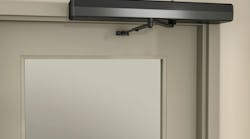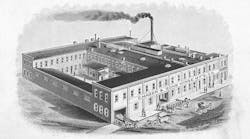
Norton Door Controls, a division of ASSA ABLOY, has been manufacturing door checks, the precursor of the door closer, since Lewis C. Norton founded the Norton Door Check Company in 1880. A Door Check originated as a device that prevents a door equipped with a spring closing mechanism from slamming. These two components evolved into the door closer. Today’s standard hydraulic door closer uses a combination of managed fluid movement and spring pressure to control a door’s opening and closing cycles.
Over the years, improvements in door closer technology have produced more efficient closer models with capabilities including adjustable spring power, cam action, backcheck, delayed closing action, and improvement in control over the closing cycle. This is necessary to accommodate modern buildings and today’s rules and regulations.
One of the new challenges for door closers is to accommodate our aging population and persons with disabilities while providing an alternative to power door operators. Many door closers have the ability to delay their closing cycles. However, they are not designed to evaluate the speed at which a person moves through the doorway and to hold the door open until the person has passed completely through the doorway once they have opened the door.
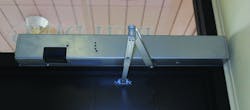
To accommodate this, the Norton SafeZone electromechanical door closer/holder is designed for interior installation that incorporates a motion sensor and a solenoid with shut-off circuitry built into the closer assembly. The SafeZone is certified and tested for ANSI/BHMA A156.15 and UL-10C Positive Pressure. The SafeZone is Fail Safe. The solenoid will de-energize, allowing the door to close in the event of power failure.
When the motion sensor picks up movement during the opening, the solenoid stops the flow of fluid moving through the closer body. The unit can also be set to delay closing once no motion is detected (adjustable from 0.5 to 20 seconds).
The SafeZone creates a “safe zone” for any person needing more time to move through the opening. With a SafeZone installed, as the door is being opened, if movement is detected, the door can continue to be opened or stay in that position, giving the person or group of people additional time to move through the doorway. As long as motion is detected, the solenoid will not release. When no motion is detected for a period of time, the solenoid will release, permitting the door to close.
When a person is opening the door and enters the “safe zone,” the motion sensor detects the movement and the solenoid is powered, restricting the flow of fluid, resisting the door from closing. The door is still within the opening cycle and comes to a stop when pressure is no longer exerted.
At this point in time, the SafeZone becomes a holder. A physically disabled person in a wheelchair, an elderly person moving slowly, a group of children exiting an assembly hall are all protected while the door is not moving. As long as movement is detected in the “safe zone”, the door will remain still. When movement is no longer detected in the “safe zone”, the hold open times out and then permits the door to close.
A properly adjusted SafeZone will not permit a door to close during the opening portion of the cycle. Once SafeZone times out and the door begins to close, if movement is detected in the “safe zone,” the door will continue to close until the door is stopped or held open from closing. The solenoid will not stop a door during the closing cycle.
Door closers are manufactured according to the ANSI/BHMA A156.15 Closer Holders, Electromagnetic and Electromechanical Standard. The Standard reads: 5.1.6 Test: The force required to release the door manually shall not exceed 40 lbs (178 N) when measured 30 in (762mm) from the hinge centerline.
Installation
For this article, I was invited to the installation of a SafeZone door closer onto the exterior door of a medical facility that has a pharmacy just inside. The right hand outswing narrow stile glass aluminum door is set into a glass aluminum wall. An electrical room is approximately 45 feet away from the doorway. The first floor of the building has a drop ceiling. However, the wall extending perpendicular from the hinge side of the doorway is a firebreak wall. The doorway of the building is adjacent to parking and is used by employees, patients and families. During the installation, there was a good deal of traffic as the ladder had to be moved about every seven to ten minutes to allow people access and egress.
Note: Always make sure the door is operating properly prior to installing any hardware. If the door scrapes on ground or will not properly fit the opening, installing a SafeZone or any lock hardware will not solve the problem. Fix whatever is necessary in order for the door to operate properly, and then install.
The Norton 7100SZ Series SafeZone is available in different configurations. Ordering is by configuration, starting with whether the unit will be mounted onto the Pull or Push Side of door. Then specify the Closer Size, whether the unit is mounted onto a Right Hand (Left Hand Reverse) or Left hand (Right Hand Reverse) door. Voltage options are 24VDC or 120VAC. The SafeZone is available with an Aluminum, Statuary Bronze, Dull Bronze, Black, Medium Amber or Gold finish. If the closer is ordered for a Pull Side of door application, the unit comes with one of two slide arm and track options. Three spring sizes (3, 4, 5) are gauged by the door width (up to 48”).
The SafeZone is approximately 28 inches long. The closer body, circuit board and the motion sensor are mounted onto an aluminum back plate.
The installed SafeZone was a model 7123SZ Right Hand 24VDC in the 689 Aluminum finish. The “2” indicates a push side application. The double lever arm accommodates a 2-3/4”-4” reveal for a door opening up to 180 degrees or a 4”-7” reveal for a door opening up to 165 degrees. The “3” indicates the spring size for a door up to 42”.
The power requirement of the Norton SafeZone is minimal. For 24VDC operation, the amperage draw does not exceed .086 Amps.
For this installation, a Securitron BPS-12/24-1 Dual Voltage Boxed Power Supply was installed. The BPS-12/24-1 is a UL Class 2 listed power supply that supplies one full AMP continuous filtered and regulated current output. It allows for wire runs without the use of conduit from power supply to the door.
Note: The SafeZone requires a minimum of 3-½” clearance from the bottom of the header.
The SafeZone was mounted onto the interior side of the right hand door. The installation was straight forward, having the benefit of a drop ceiling to simplify the wire run from the Electric Room to the top of the aluminum glass wall directly above the hinge side of the door. The decision was made to do a “clean” installation, concealing the wiring. Although there is always an option, a “clean” installation is best.
The aluminum glass wall provided the benefit of a hollow rectangular aluminum hinge jamb through which the 18 Gauge four conductor cable was run. Once the Securitron BPS-12/24-1 Power Supply was installed in the electric room, the four conductor 18 gauge cable was run through the drop ceiling to the glass aluminum wall.
The rectangular aluminum section extending above the vertical jamb enabled the cable to be run from above the drop ceiling down into the door header. Three holes were drilled to provide access. The first hole, ½” in diameter, provided entry into the top of the extruded aluminum rectangular tubing. The second hole 3/8” in diameter, and third hole, one inch in diameter, were drilled into the header. Since this installation was not into a fire rated opening, a one inch hole could be drilled. Note: For fire rated openings, a 7/8” hole would have been drilled.
The second hole was used to capture the cable and change the direction from vertical down to horizontal into the header. The third hole provided an exit and entry through the electrical hole in the back plate. From there three wires (red, green and black) made the electrical connection. The three holes are not visible once the installation has been completed.
To provide the greatest possible adjustability, the unit was installed having a door opening angle of 100 to 180 degrees.
To install the SafeZone onto the header, five ¼-20 screw holes were drilled and tapped into the aluminum header. Two holes were drilled and tapped into the door’s top rail for the shoe. A #7 drill and a ¼-20 tap were used to prep the installation.
As the SafeZone was positioned against the header, the cable was slid through the base plate. Loctite® Threadlocker Red 271™ was used on the seven ¼-20 screws prior to installation.
With the unit installed onto the header and the adjustable arm onto the door, the main arm is placed onto the spindle with the arm mark aligning with the pinion flat. The arm screw and arm washer secure the main arm to the spindle. The adjustable arm is positioned perpendicular to the door in the closed position.
Once the unit is mechanically installed, make any adjustment to closing force, the latch, sweep and backcheck in order to properly close the door. Adjustment instructions are printed on the inside of the cover. Once the mechanical portion of the door closer is adjusted, the next step is to provide power.
Connect the cable red, green and black wires to the input circuit board. The maximum wire gauge the SafeZone connector will accept is 18 AWG. Connect the wires to the power supply. The motion sensor red LED will illuminate when initially powered and when someone is detected until movement is no longer detected.
The final step is to set the detection area. The sensor can be adjusted from horizontal (0 to 45 degrees), and 15 degrees to the left or right. The detection area can be in three positions. When the motion sensor is horizontal, it covers both sides of the door. When the sensor is at 30 degrees, the detection area extends from vertical out to approximately 30 degrees. When the sensor is at 45 degrees, the detection area extends from vertical out to approximately 45 degrees, 50 percent farther.
The installation, traffic flow and physical abilities of the people determine the position and size of the sensing field and the hold open time. The size of the detection area is determined by the height at which the SafeZone is installed. The motion sensor mounting height is from a nominal of seven feet to a maximum of ten feet.
Hold open time is the time the door will remain open after movement is no longer detected. It is adjustable from 0.5 seconds to 20 seconds. The default time is ten seconds. According to Norton, the average person requires approximately five to seven seconds to walk through the doorway. A person with a cane may require eight to 14 seconds. A person in a wheel chair may require 16 to 20 seconds.
Time adjustments can be made by pressing and releasing the up or down buttons on the right side of the motion sensor assembly. To reset the hold open time to the default time, press both of the push buttons simultaneously for three seconds.
Test the SafeZone to be certain the system is operational with a sufficient hold open time. Make any adjustments necessary. Once the system is operating properly, install the cover.
Norton has included yellow with black print stickers to be installed onto both sides of the door notifying people this door will close automatically.
The SafeZone warranty is two years.
For more information, contact your local locksmith distributor or Norton, 3000 Highway 74 East, Monroe, NC 28112 Telephone 877-974-2255 Fax: 800-338-0965 Web Site: www.safezone.nortondoorcontrols.com.